Getting MailChimp and Formalicious to play nice.
Hooking up MailChimp to any Formalicious Form
One of the biggest struggles our developers complain about in ModX is having to manually create forms.
Way back when, we used WuFoo for all our forms - we had hundreds, if not into the thousands of forms. Why? Because anyone in the Customer Service Team could make a basic form, and with a small amount of training/research, they could extend the functionality easily, including linking WuFoo sign-up forms to MailChimp.
After a few years, we moved all our forms directly into Modx, because the WuFoo script loading and CSS styling meant that each form needed Developer input to style it and make sure the loading speeds were optimal. Additionally layout became time-consuming when clients wanted a bit more than the basic layouts.
This move speeded up our page loads, extended the default functionality we were able to offer, and reduced our reliance on 3rd party software as well as opening up our forms to a wide range of customisable layouts and designs without having to override WuFoo default styles and layouts.
We were happy for a while, until the volume of new forms picked up, when we realised that each form needed to be hand-coded by the Developers and the team missed the user friendly "click to add" form fields and the "drag and drop" re-ordering of fields. These "quick" jobs had to go into the Developers task list, and they became nuisances to all, as they slowed down delivery times and added to the Developers workload.
Enter Formalicious! The developers got excited, the Customer Services team rejoiced, and we lept on board the User Friendly Forms train. It was glorious, it was easy... and yet it never quite worked. Not Formalicious, which was great, or the Exrtras we'd been using on FormIT, or anything else... it was just nothing quite played nice.
After a long time and a lot of fiddling, we've got two major features playing nice. It does require initial Developer setup of the Form templates etc, and there is a little bit of training of a semi-manual setup per form, but we have Formalicious passing directly into MailChimp, and using Recaptchav3 with a Lite Loading system.
The basics of this are to use the Advanced fields of each form and pass in the relevant fields into the MC Extra, as well as use the PostHooks options. There are some limitations to what you can pass back to MailChimp in terms of Tags etc, but for those more advanced cases, you can always build direct in FormIT.
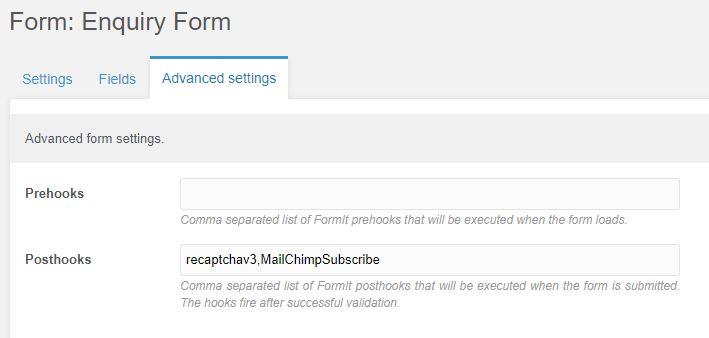
recaptchav3,MailChimpSubscribe
Post Hooks added per Form. You can force them into the Form Tpl, but we prefer to offer flexibility for MailChimp, although for ReCaptcha, it's often best to make them default on every form.
MailChimp fields to add to Advanced fields section of the Formalicious Form
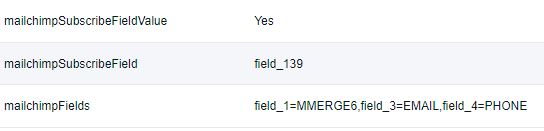
Match the Form fields with the MailChimp Merge fields
- mailchimpFields
Flag to use a custom Field value to sign up with
- mailchimpSubscribeFieldValue
The Field ID for Sign Up optin (Radio or Checkbox)
- mailchimpSubscribeField